Restaurants in Dubai and London serve guests from everywhere, and the team on the floor does not always share a language with the table. WowMenu lets the guest browse and order in their own language while your staff read the same order in the language they work in.
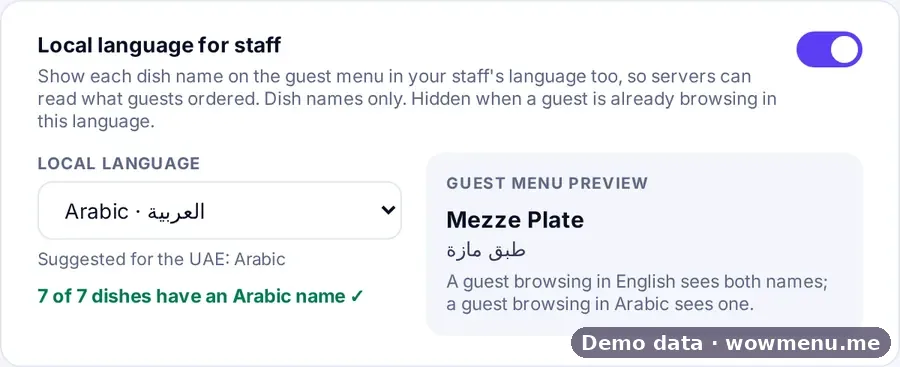
The owner chooses a staff language in Settings: Arabic, English, Hindi, Urdu, Malayalam, Filipino, Bengali, Nepali, French, Vietnamese, Chinese or Russian. Every dish name then also appears in that language. If the guest is already browsing in it, only one name shows.
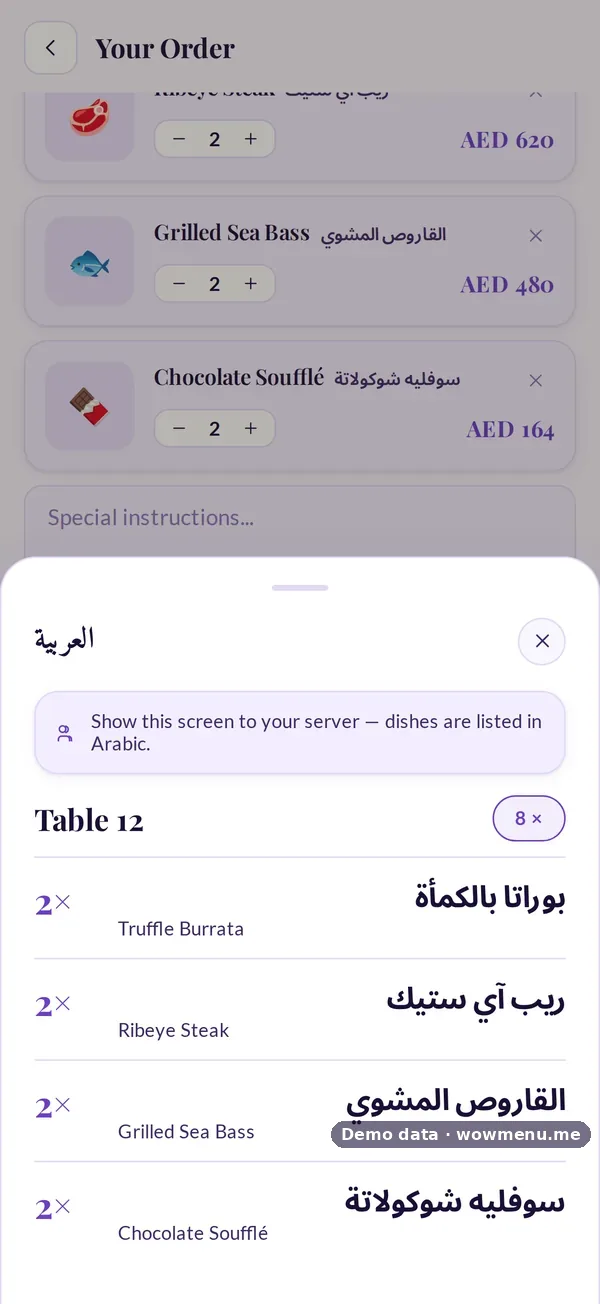
When a table is ready to order, Show to staff opens a full-screen order in large staff-language text, with quantities, options, round numbers and allergies, so a server can read exactly what the table ordered.
Staff-language names come from the names on your menu. A coverage check in the portal shows how many dishes already have a name in your chosen language and flags the ones that do not, so you know what to fill in. Included from the Menu plan.
How it connects
What the owner sets up or sees in the portal, and what the guest sees in the QR menu. Screens are from the demo restaurant, Maison Lumière, with demo data.
Pick a staff language, and every order can be read in it
The owner chooses the staff language and sees how many dishes already have a name in it. Guests keep browsing in their own language, and the order opens for staff in large text.
Key benefits
What Staff-Language Ordering does for your restaurant
Staff-language dish names
Pick a staff language once in Settings. Each dish shows its name in that language beside the guest's language, or a single name when they match.
Show to staff
A full-screen order in large staff-language text with quantities, options, round numbers and allergies, so nothing is lost in translation.
A coverage check
See how many dishes already have a name in the chosen language, and which ones still need one.
How it works
The owner chooses a staff language
In Settings, pick from twelve languages. The setting is yours to change at any time.
The guest browses in their own language
The menu, MenuGPT's answers and the order flow all appear in the language the guest chose, remembered for next time.
Dish names appear for staff too
Each dish also carries its name in the staff language. If both languages are the same, only one name shows.
Show to staff
The guest or server opens the full-screen order. It lists exactly what the table ordered, in large text, with allergies.
Frequently asked
Which staff languages can I choose?
Arabic, English, Hindi, Urdu, Malayalam, Filipino, Bengali, Nepali, French, Vietnamese, Chinese or Russian.
Does the guest see the staff language?
The guest browses in their own language. Dish names also appear in the staff language, and if the guest is already browsing in it, only one name shows.
Does WowMenu translate my dish names automatically?
Auto-translate can fill dish names in your menu languages, and the portal's coverage check shows which dishes have a name in your staff language and which do not.
What does Show to staff include?
Quantities, options, round numbers and allergies, in large staff-language text on a full-screen order.